
本文使用版本
- PlayFab SDK: 2.86.2005 18
前言
本文介紹的功能以前提是玩家已經登入,因此如果你想先了解登入流程,建議先閱讀下面這篇文章。
允許存取個人檔案資料
首先,你必須先在 PlayFab 中設定好讓 API 可以存取玩家個人檔案的權限。
請先打開 PlayFab 管理後台,接著從齒輪圖示 -> Title settings 進入設定畫面,然後選擇 Client Profile Options。
之後在「ALLOW CLIENT ACCESS TO PROPERTIES」下方,把應用程式需要存取的個人檔案屬性切換為啟用。
這次我們想取得 DisplayName,所以把 DisplayName 的切換開關打開即可。
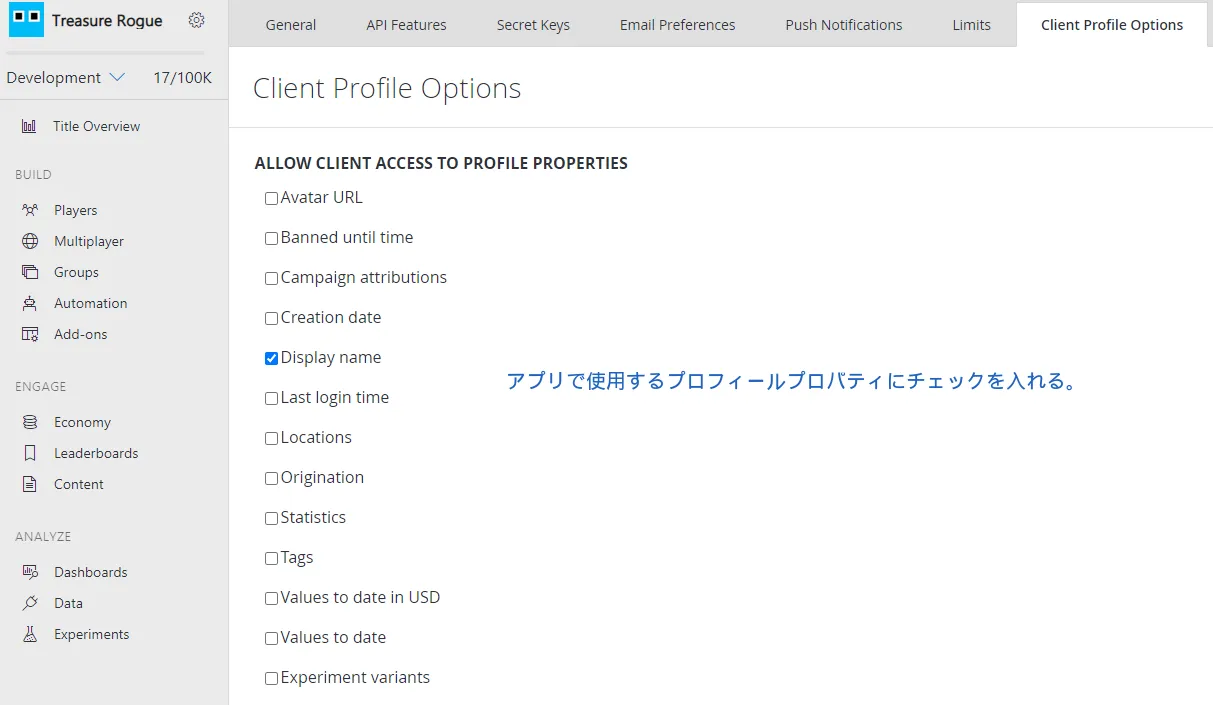
設定 DisplayName
既然這篇文章要取得 DisplayName,那就先把 DisplayName 設定好吧。
using UnityEngine;
using PlayFab;
using PlayFab.ClientModels;

public void SetPlayerDisplayName (string displayName) {
	PlayFabClientAPI.UpdateUserTitleDisplayName(
		new UpdateUserTitleDisplayNameRequest {
			DisplayName = displayName
		},
		result => {
			Debug.Log("Display name was set successfully.");
		},
		error => {
			Debug.LogError(error.GenerateErrorReport());
		}
	);
}
取得個人檔案
如果要取得玩家的個人檔案,請使用 GetPlayerProfile 函式。
using UnityEngine;
using PlayFab;
using PlayFab.ClientModels;

public void GetDisplayName (string playfabId) {
	PlayFabClientAPI.GetPlayerProfile(
		new GetPlayerProfileRequest {
			PlayFabId = playfabId,
			ProfileConstraints = new PlayerProfileViewConstraints {
				ShowDisplayName = true
			}
		},
		result => {
			string displayName = result.PlayerProfile.DisplayName;
			Debug.Log($"DisplayName: {displayName}");
		},
		error => {
			Debug.LogError(error.GenerateErrorReport());
		}
	);
}
PlayFabId
這個欄位用來指定要取得哪一位玩家的個人檔案。
PlayFabId 是 PlayFab 用來識別玩家的 ID。
如果你想更深入了解,可以參考下面這篇文章。
【PlayFab】什麼是 PlayFabAuthenticationContext?【Unity】
PlayerProfileViewConstraints
這個欄位用來指定要取回哪些個人檔案屬性。
PlayerProfileViewConstraints 裡有好幾個以 Show○○ 開頭的 bool 成員,所以你想取得哪些屬性,就把對應的 Show○○ 設成 true。
例如,如果你想同時取得 DisplayName、AvatarUrl 和 LastLoginTime,可以這樣寫:
ProfileConstraints = new PlayerProfileViewConstraints {
	ShowDisplayName = true,
	ShowAvatarUrl = true,
	ShowLastLoginTime = true
}
結語
目前我仍在把 PlayFab 導入專案,也還在持續學習中。
如果本文有任何錯誤,還請不吝指正。