![Article image for [PlayFab] Getting a Player Profile [Unity]](/_astro/cover.DjCafF6t_6qJkl.webp)
Version used in this article
- PlayFab SDK: 2.86.2005 18
Introduction
The feature in this article requires the player to be logged in first, so if you want to learn about login, please see the article below.
PlayFab: Generating IDs and Logging In [Unity]
Allow Access to Profile Data
First, you need to configure PlayFab so the API can access the player’s profile.
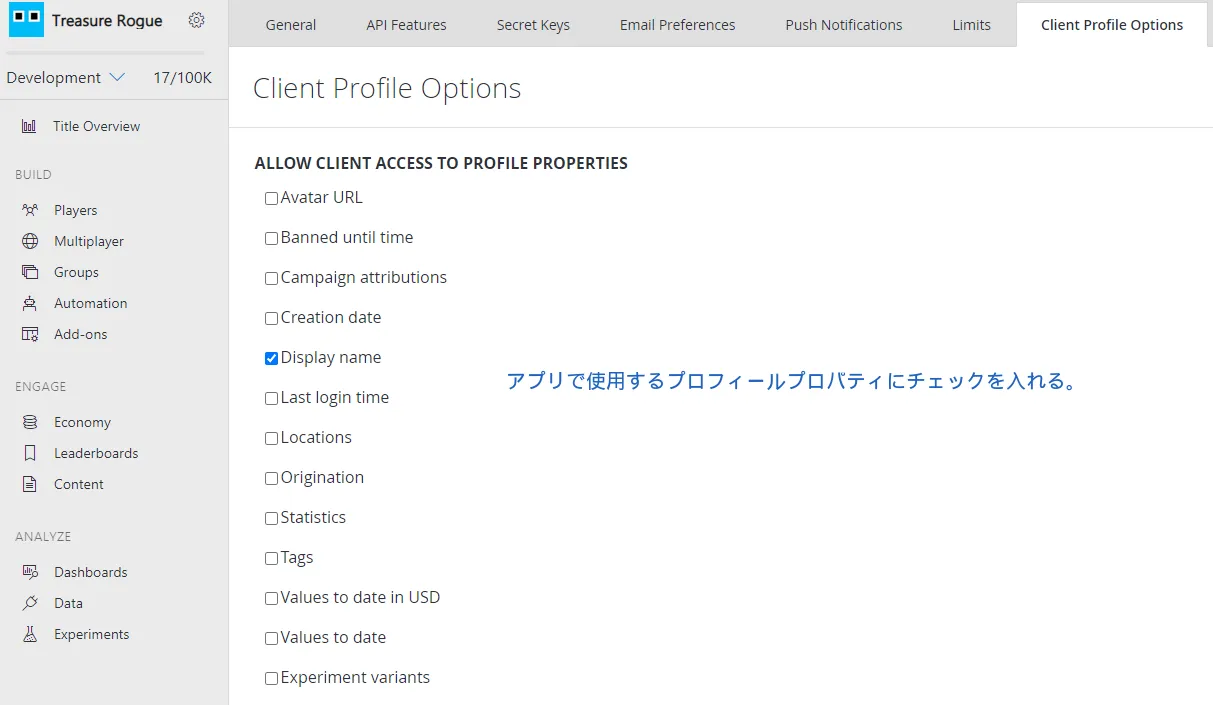
Open the PlayFab dashboard. Then open the settings screen from the gear icon -> Title settings, and select Client Profile Options.
Then, under “ALLOW CLIENT ACCESS TO PROPERTIES”, check the toggles for the profile properties your app should be able to access.
In this article, I want to access DisplayName, so I checked the DisplayName toggle.
Set DisplayName
Since I want to retrieve DisplayName in this article, let’s set DisplayName first.
using UnityEngine;
using PlayFab;
using PlayFab.ClientModels;

public void SetPlayerDisplayName (string displayName) {
	PlayFabClientAPI.UpdateUserTitleDisplayName(
		new UpdateUserTitleDisplayNameRequest {
			DisplayName = displayName
		},
		result => {
			Debug.Log("Display name was set successfully.");
		},
		error => {
			Debug.LogError(error.GenerateErrorReport());
		}
	);
}
Retrieve the Profile
To retrieve the profile, use the GetPlayerProfile function.
using UnityEngine;
using PlayFab;
using PlayFab.ClientModels;

public void GetDisplayName (string playfabId) {
	PlayFabClientAPI.GetPlayerProfile(
		new GetPlayerProfileRequest {
			PlayFabId = playfabId,
			ProfileConstraints = new PlayerProfileViewConstraints {
				ShowDisplayName = true
			}
		},
		result => {
			string displayName = result.PlayerProfile.DisplayName;
			Debug.Log($"DisplayName: {displayName}");
		},
		error => {
			Debug.LogError(error.GenerateErrorReport());
		}
	);
}
PlayFabId
This specifies which player’s profile to retrieve.
PlayFabId is the ID used to identify a player in PlayFab.
If you want to learn more, I wrote about it in the article below.
PlayFab: What Is PlayFabAuthenticationContext? [Unity]
PlayerProfileViewConstraints
This specifies which profile properties to retrieve.
PlayerProfileViewConstraints has several Show○○ members of type bool, so set true on every Show○○ member you want to retrieve.
For example, if you want to retrieve DisplayName, AvatarUrl, and LastLoginTime, write it like this:
ProfileConstraints = new PlayerProfileViewConstraints {
	ShowDisplayName = true,
	ShowAvatarUrl = true,
	ShowLastLoginTime = true
}
Closing Thoughts
At the moment, I am still in the middle of introducing PlayFab into a project and learning as I go.
If I have made any mistakes, I would appreciate it if you let me know.