서론
가끔은 완전히 균등한 랜덤이 아니라, 각 항목의 가중치에 따라 선택될 확률이 달라지는 랜덤 선택을 구현하고 싶을 때가 있습니다. 가챠나 아이템 드롭률이 대표적인 예입니다.
이 글에서는 “WeightedRandom”을 구현하는 방법을 소개합니다.
사용 예시
먼저 WeightedRandom의 간단한 사용 예시를 보겠습니다.
public class WeightedItem {
	public string id;
	public float weight;
}

public class WeightedSelector : MonoBehaviour {

	public List<WeightedItem> items = new List<WeightedItem>();

	public void Select () {
		WeightedItem selectedItem = items[items.WeightedIndex(item => item.weight)];
		Debug.Log(selectedItem.id);
	}
}
이렇게 하면 한 줄로 가중 랜덤 선택을 구현할 수 있습니다.
WeightedRandom 코드
아래가 WeightedRandom을 구현하는 코드입니다.
using System;
using System.Linq;
using System.Collections.Generic;

using Random = UnityEngine.Random;

public static class WeightedRandom {

	public static int WeightedIndex (this IEnumerable<float> source) {
		return WeightedIndex(source,Random.value);
	}

	public static int WeightedIndex (this IEnumerable<float> source,float value) {
		float[] weights = source.ToArray();

		float total = weights.Sum(x => x);
		if (total <= 0f) {
			return -1;
		}

		int i = 0;
		float w = 0f;
		foreach (float weight in weights) {
			w += weight / total;
			if (value <= w) {
				return i;
			}
			i++;
			}
		return -1;
	}

	public static int WeightedIndex<T> (this IEnumerable<T> source,float value,Func<T,float> weightSelector) {
		return source
			.Select(x => weightSelector.Invoke(x))
			.WeightedIndex(value);
	}

	public static int WeightedIndex<T> (this IEnumerable<T> source,Func<T,float> weightSelector) {
		return WeightedIndex(source,Random.value,weightSelector);
	}

}
이미지
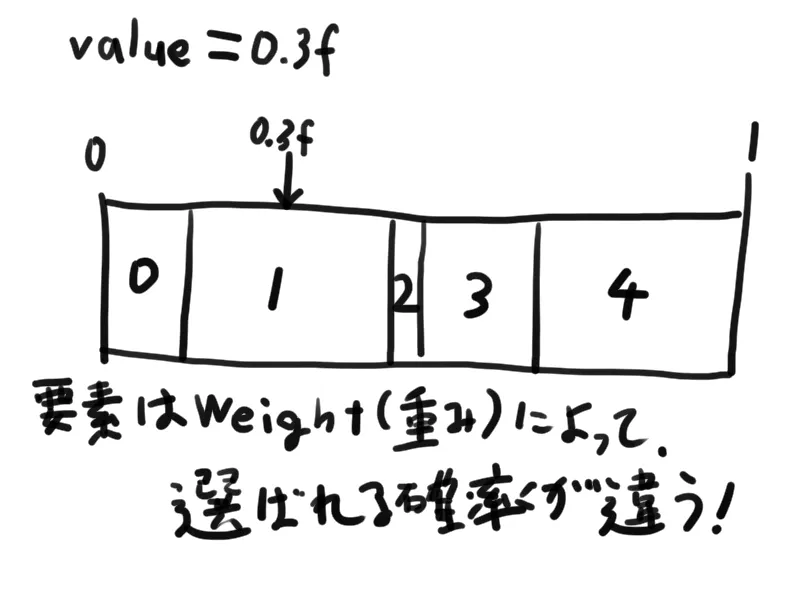
아래 이미지를 보면 WeightedRandom이 무엇을 하는지 더 쉽게 이해할 수 있습니다.
WeightedSelect 함수 추가(2020/06/06)
WeightedIndex만 있으면, 인덱스가 아니라 요소 자체를 가져오고 싶을 때 약간의 추가 작업이 필요했습니다. 그래서 원본 타입의 요소를 그대로 반환하는 WeightedSelect 함수를 추가했습니다.
public static class WeightedRandom {

	// omitted

	public static T WeightedSelect<T> (this IEnumerable<T> source,Func<T,float> weightSelector) {
		int index = WeightedIndex(source,weightSelector);
		return (index >= 0) ? source.ElementAt(index) : default;
	}
}
맺음말
제가 직접 개발한 게임 Treasure Rogue에서도 이 코드를 사용하고 있습니다. 예를 들면 적의 드롭 아이템이나 보물상자의 아이템을 고를 때 활용합니다.