![Article image for [PlayFab] Registering and Updating DisplayName [Unity]](/_astro/cover.DjCafF6t_6qJkl.webp)
Version used in this article
- PlayFab SDK: 2.86.2005 18
Introduction
Since players need to be logged in first, please see the following article if you want to learn about login.
PlayFab: Generating IDs and Logging In [Unity]
Registering and Updating the Player Display Name
With the player logged in, you can register or update the player’s name by calling UpdateUserTitleDisplayName as shown below.
using UnityEngine;
using PlayFab;
using PlayFab.ClientModels;

public void SetPlayerDisplayName (string displayName) {
	PlayFabClientAPI.UpdateUserTitleDisplayName(
		new UpdateUserTitleDisplayNameRequest {
			DisplayName = displayName
		},
		result => {
			Debug.Log("Display name was set successfully.");
		},
		error => {
			Debug.LogError(error.GenerateErrorReport());
		}
	);
}
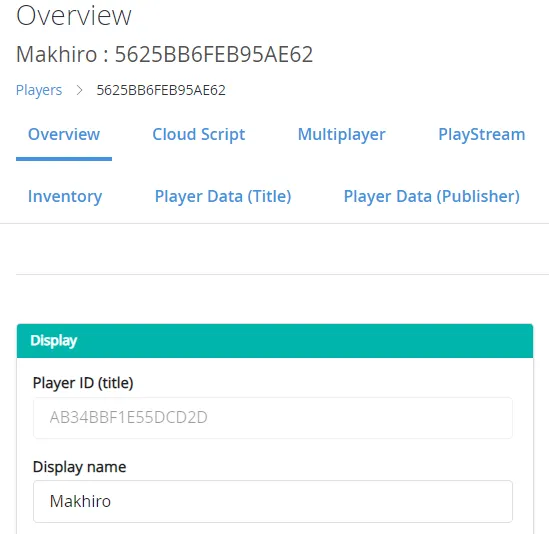
If you check the player in the PlayFab dashboard, you can see that the registered DisplayName is shown there.
Allowing duplicate player names
In PlayFab, player names are generally not allowed to be duplicated. If you try to register a duplicate name, you will get an error.
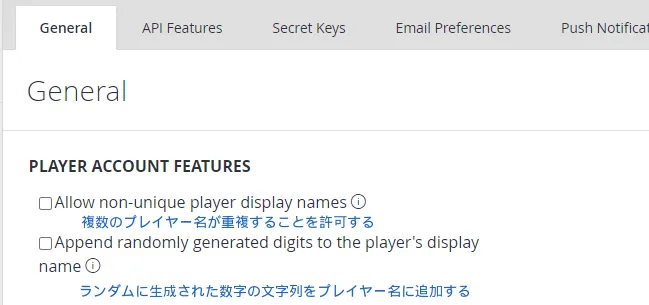
However, you can allow non-unique names from the PlayFab dashboard.
Open Title settings from the gear icon in the PlayFab dashboard. You should see the screen below, and if you want to allow duplicate names, check the box.
References
Closing Thoughts
Registering a player name is very simple. Once the player is logged in, it only takes a single API call.
If you plan to show player names inside your game, it is worth wiring this up early.